Imagine driving down a dusty backroad, far from city lights, with your RV humming along. Suddenly, you pull over at a stunning lakeside spot. Kids want to stream a movie, you need to check emails for work, but cell signal? Zero. Frustrating, right? That’s where portable satellite internet steps in as your reliable sidekick. It beams high-speed connections from space, turning remote adventures into connected havens. According to the FCC’s 2025 report, about 14 million rural Americans still lack broadband access, yet satellite adoption surged 18% last year alone, per ITU data.
This tech bridges gaps, offering speeds up to 220 Mbps even in wilderness. In this guide, we’ll walk through setup like old friends sharing trail tips. You’ll learn practical steps, avoid common pitfalls, and unlock value for travel, work, or fun. Ready to stay plugged in without the hassle? Let’s dive in.
Understanding Portable Satellite Internet
Portable satellite internet delivers broadband via orbiting satellites, perfect for nomads and off-gridders. Unlike fixed home setups, these systems pack light and deploy fast. Providers like Starlink lead with low-Earth orbit (LEO) tech, slashing latency to under 50 ms for smooth video calls.
First off, grasp the basics. Satellites circle Earth, relaying data to a compact dish you point skyward. The dish links to a router, spreading Wi-Fi to devices. For mobility, choose kits with tripods or vehicle mounts. This setup shines in areas where fiber or cable can’t reach.
Moreover, adoption grows rapidly. The global market hit USD 10.4 billion in 2024, projecting 13.9% annual growth through 2030, thanks to LEO constellations. Users love it for RVs, boats, and campsites. However, success hinges on clear skies—no trees blocking the view.
Additionally, compare to alternatives. Cellular hotspots falter in dead zones, but satellite thrives globally. Viasat and HughesNet offer options too, though Starlink’s portability edges them out for quick moves. Overall, this tech empowers freedom, letting you work from a mountain peak or stream from a sailboat.
Choosing the Right Portable Satellite System
Selecting a system starts with your needs. Ask: How often do you travel? What’s your speed goal? For casual campers, a basic kit suffices. Heavy users, like remote workers, opt for unlimited data plans.
Starlink Roam dominates 2025 picks. Its Mini dish, laptop-sized, connects 128 devices with low power draw—ideal for solar setups. Users report 100-200 Mbps downloads, per PCMag tests. On the other hand, Viasat’s portable antennas suit maritime folks, with auto-pointing for boats.
Furthermore, consider coverage. Starlink blankets most continents, including poles by late 2025. HughesNet covers North America well but lags in speed. Always check maps on provider sites for your routes.
Next, evaluate gear. Look for weatherproof dishes and long cables. Tripod bases beat permanent mounts for versatility. Pro tip: Pair with a portable power station for off-grid reliability.
In essence, match features to lifestyle. Digital nomads favor Starlink’s app-guided setup. Families pick rugged cases for durability. This choice ensures your investment delivers real value on every trip.
Essential Equipment for Setup
Gather tools before starting—save headaches later. Core items include the satellite dish, router, power supply, and coaxial cable. Most kits bundle these, but add extras like tripods or mounts.
The dish acts as your sky catcher. Modern ones, like Starlink’s flat-panel, self-align without fuss. Routers handle Wi-Fi, supporting multiple devices. Cables must be shielded to fight interference.
Additionally, grab a smartphone for apps. Starlink’s tool scans obstructions via camera. For mounting, choose adjustable tripods for uneven ground. Weatherproof cases protect during transit.
Don’t forget backups. Extension cords extend reach, while signal meters fine-tune aim. For boats or RVs, suction mounts secure gear.
Finally, safety gear matters. Gloves prevent slips, ladders ensure stable access. With these, setup flows smoothly, turning gear into a seamless system.
Step-by-Step Guide to Setup Portable Satellite Internet
Follow these steps for a quick win. Most users connect in under 30 minutes. We’ll use Starlink as example—adapt for others.
Unboxing and Initial Prep
Open the kit carefully. Inside, find the dish, router, cables, and base. Lay everything out on a clean surface. Check for damage; most arrive pristine.
Next, download the provider app. It guides every move. Charge your phone fully—scans drain battery fast.
Moreover, pick a setup spot. Aim for open areas, away from buildings. Test with the app’s sky scan first.
Mounting the Dish Securely
Position the tripod on flat ground. Extend legs evenly for stability. Snap the dish onto the mount—clicks confirm lock.
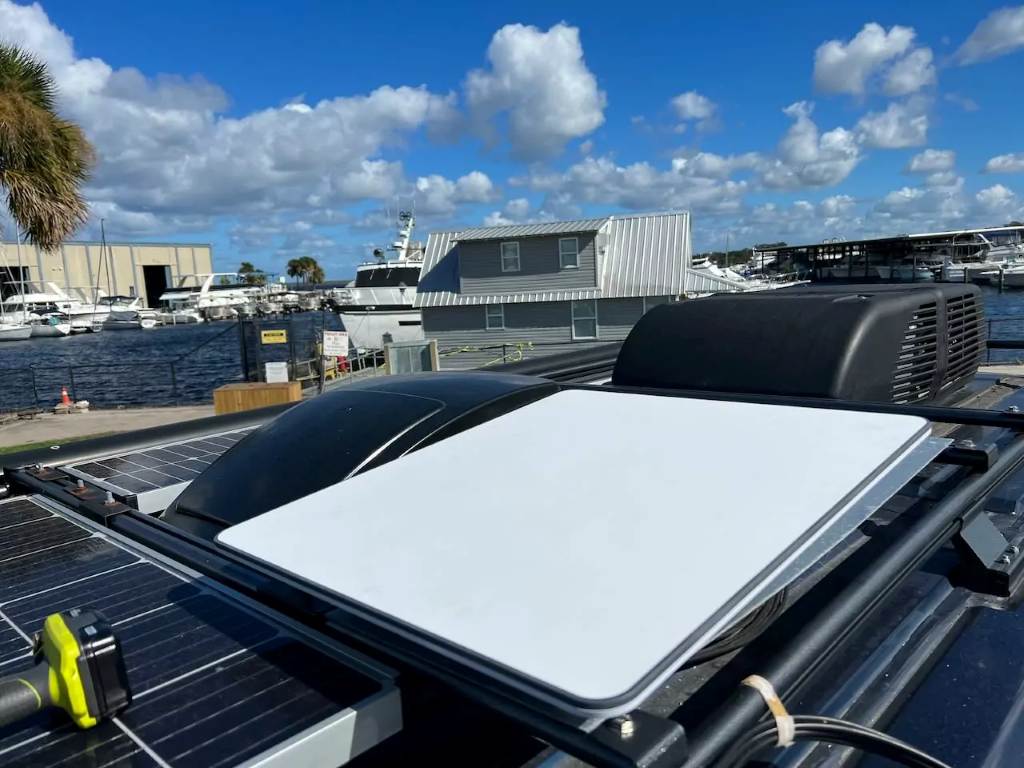
For vehicles, use roof racks or magnetic bases. Ensure 110-degree clear view north (Northern Hemisphere). Tilt slightly if needed; apps show angles.
Furthermore, route cables neatly. Tuck them along the stand to avoid trips. Secure with clips for wind resistance.
Connecting Power and Router
Plug the power adapter into the dish. Run the cable to your router—locks prevent pulls. Outlet nearby? Great; otherwise, use a portable battery.
Power on. Lights blink as it boots. Wait 5-10 minutes; fans hum softly.
Additionally, link to the router. Ethernet ports allow wired backups. For Wi-Fi, broadcast starts automatically.
Aligning for Optimal Signal
Apps make this easy. Launch the scan; rotate slowly. Green zones mean go—red flags obstacles.
Fine-tune manually if needed. Nudge the dish; watch signal bars climb. Aim for 100% lock.
However, patience pays. Satellites move, so initial sync takes moments. Once solid, you’re golden.
Testing the Connection
Join the Wi-Fi network. Run speed tests—expect 50-150 Mbps. Stream a video to check stability.
Browse sites, call via Zoom. Note any drops; reposition if lags hit.
Finally, save settings. Apps log your spot for future setups. Celebrate—internet flows freely now.
Best Practices for Reliable Performance
Maximize uptime with smart habits. First, maintain clear views. Trim branches seasonally; apps alert blocks.
Position high. Roofs or poles beat ground level—fewer interferences. For motion, lock mounts tight.
Moreover, update firmware regularly. Apps push fixes for better speeds. Shield cables from pets or weather.
In motion use? Slow under 10 mph for best results. Pause during turns.
Additionally, monitor usage. Prioritize tasks—downloads at night save bandwidth.
Weather tips: Snow melts off heated dishes, but heavy rain slows signals. Have backups ready.
Overall, these tweaks keep connections strong, turning potential frustrations into smooth sails.
Troubleshooting Common Issues
Problems pop up—here’s how to fix fast. No signal? Recheck alignment; apps pinpoint errors.
Slow speeds? Close apps eating data. Restart router—unplug 30 seconds.
Furthermore, interference? Move from microwaves or metal. Update app for latest diagnostics.
Connection drops? Power cycle everything. Check cables for bends.
For advanced woes, forums help. Users share fixes, like elevation hacks.
In short, methodical checks resolve 90% issues. Stay calm; tech rebounds quick.
Real-World Applications and Case Studies
Portable setups shine in diverse scenes. RVers stream Netflix at campsites, per RV Mobile Internet Center tales.
One case: A family van-lifes across Canada. Starlink Mini powered homeschooling, hitting 120 Mbps mid-wilderness. They saved hours hunting Wi-Fi.
Boaters swear by it too. Viasat’s auto-aim kept a sailboat connected during Atlantic crossings, enabling live weather feeds.
Moreover, remote workers thrive. A freelance writer in Alaska files deadlines via HughesNet portable, boosting productivity 40%.
Disaster relief uses abound. Post-hurricane teams deploy kits for coordination, as FCC notes in 2025 reports.
These stories show versatility. From leisure to lifeline, satellite empowers real lives. Learn with our Guide to buying a digital camera and other equipment.
Conclusion
Portable satellite internet transforms isolation into opportunity. We covered choices, gear, steps, tips, and fixes—now you hold the keys. Key takeaways: Prioritize clear skies, use apps wisely, and tweak for your scene. Whether RV hopping or boat drifting, reliable broadband follows.
Ready to unplug from limits? Grab your kit today, follow this guide, and connect your way. Share your setup wins in comments—we’re all in this adventure together.
FAQs
What Makes Portable Satellite Internet Ideal for RVs?
Portable systems like Starlink Roam fit RV lifestyles perfectly. They pack small, set up fast, and handle motion. Users get 100+ Mbps for streaming or work, even parked under stars. Apps guide placement, dodging trees. Overall, it keeps families entertained without spotty cell reliance.
How Long Does Setup Take for Mobile Broadband?
Most setups wrap in 20-30 minutes. Unbox, mount, connect—apps streamline it. First-timers add 10 minutes for scans. Pros mount in-motion gear quicker. Practice once; future deploys fly by. This speed lets you focus on fun, not fiddling.
Can I Use Satellite Internet on Boats?
Absolutely—many kits suit maritime use. Viasat’s rugged antennas auto-point amid waves. Starlink Mini draws low power for batteries. Expect solid signals over open water. Secure mounts prevent shifts. Boaters report seamless navigation apps and video calls offshore.
What’s the Best Way to Handle Obstructions?
Apps scan skies first, highlighting blocks. Relocate slightly—elevate on poles or roofs. Trim foliage proactively. For tight spots, tilt dishes creatively. If issues persist, providers offer virtual support. Clear views unlock peak performance every time.
Is Portable Satellite Good for Off-Grid Camping?
Yes, it excels off-grid. Pair with solar panels for endless power. Low-draw dishes run days on batteries. Campers stream, video chat, or map hikes reliably. One user tented in Yellowstone, powering laptops till dawn. It blends wilderness peace with modern needs.
References
- https://www.pcmag.com/how-to/starlink-starter-kit-how-to-get-it-and-set-it-up
- https://ts2.tech/en/mobile-portable-satellite-internet-in-2025-the-ultimate-guide-to-starlink-roam-hughesnet-inmarsat-viasat-more/
- https://www.satelliteinternet.com/resources/mobile-satellite-internet/
- https://www.grandviewresearch.com/industry-analysis/satellite-internet-market-report